I was juggling around with several simulators on my macOS machine and I found that Xcode does not offer any easy way to clone and re-use instances of the simulator with all its settings.
Digging deeper revealed that there is a command line interface that is able to provide these functions. Since CLI is nice but there can be easier ways I made (with the help of vibe coding): SimctlHelperUI.
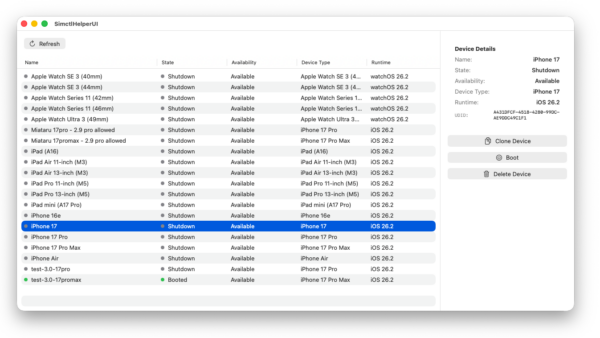
A macOS SwiftUI application that provides a graphical user interface for managing iOS simulators. SimctlHelperUI wraps the xcrun simctl command-line tool, making it easier to view, clone, delete, and control iOS simulators through an intuitive interface.
Features
- Device List View: Browse all available iOS simulators in a sortable table
- Device Management:
- Clone simulators with custom names
- Delete simulators
- Boot and shutdown simulators
- Device Information: View detailed information including:
- Device name and UDID
- Current state (Booted/Shutdown)
- Availability status
- Device type (e.g., iPhone 17 Pro)
- Runtime version (e.g., iOS 26.2)
- Visual Indicators: Color-coded status indicators for quick device state recognition
- Sortable Columns: Sort devices by name, state, availability, device type, or runtime version
- Auto-refresh: Automatically refreshes the device list after operations