Audiobookshelf is a selfhosted opensource server that hosts both all your podcasts and all your ebooks if you want.
Since I am listening to podcasts daily I wanted to use Audiobookshelf to be able to track listening progress across devices.
Now I am subscribed to 70+ podcasts with some of them having an archive of 10+ years. Tens of thousands of episodes.
This posed a seemingly huge problem to the already available Audiobookshelf-compatible podcast clients which prompted me to write my own podcast player.
I present: Kikudana
Kikudana combines the Japanese kiku — “to listen” – with tana, “shelf”. The name loosely means “a shelf for listening”, a small nod to both podcasts and Audiobookshelf.
As said there are many podcast player apps already and I thought of features that I did not find in others.
For a start: Kikudana can handle very very large podcast libraries. Talking about tens-of-thousands of podcast episodes in hundreds of podcasts. It won’t crash, it will sync, it will present and it will work. It will respect your listening queue and not interfere by deleting it. If you tap another episode it will ask you and sort your queue, never missing a beat.
There is lots of more features:
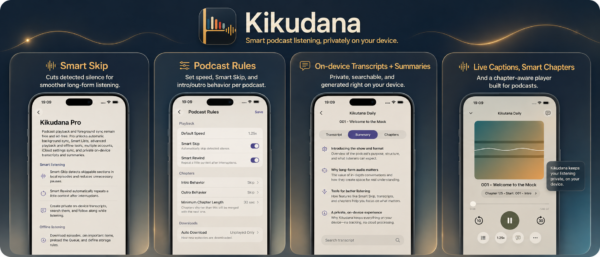
- Smart Skip – removes detected silence from downloaded episodes while keeping chapters, seeking and listening progress perfectly aligned to the original timeline.
- Smart Rewind – automatically rewinds after interruptions, so you naturally pick up where you left off.
- Podcast Rules – define playback speed, Smart Skip behavior, intro/outro skipping, transcription and summary settings individually for each podcast.
- Private on-device Transcripts – create searchable, timestamped transcripts locally with Apple’s on-device speech technology, including tap-to-seek and live word following.
- Private AI Summaries – generate chapter summaries, key points and even fallback chapter titles locally on-device with Apple Intelligence.
- Live Captions for Podcasts – display synchronized transcript captions directly on the Player cover as continuous text or compact pages.
- Smart Chapters – Kikudana can derive chapters from timestamps in shownotes or create useful time-based sections when a podcast provides no chapters.
- Powerful Smart Lists – build persistent podcast collections with their own episode views, sorting and filtering, bulk Queue actions and distinctive cover decks.
- Native CarPlay experience – Podcasts, Queue, chapters, playback speed, downloads, Smart Lists and Smart Skip use the same Player and listening state as the iPhone/iPad app.
I tried to polish it as much as possible within the last month and hope you like it.
It’s a free app for the base functionality with a pro-upgrade either perpetual or subscription. It will receive constant updates as all my apps do for years to come.
I hope you will like it!
AppStore: https://apps.apple.com/us/app/kikudana/id6785291445